superglue + radio = no
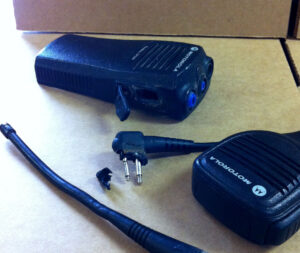
Superglued Motorola CP200

Superglued Motorola CP200 arriving at the Radio Repair Facility.

Sometimes a well meaning radio user will use a superglue like adhesive to glue items to their radio, or even attempt to fix an internal component. As nice as we can, we’d like to say… please do not do this. Why? you might ask… When a radio comes to the radio repair center for repair the electronics technician repairing the radio utilizes the radio’s accessory jack to connect his test equipment. If glue has been used to attach the remote mic or other audio device to the accessory jack then the two must be broken apart. This generally causes damage to both devices. This can be an unnecessary expense to the customer. As you can see in the picture both the radio housing and the accessory’s plug were damaged getting the two apart.

On the CP200 style radio a simple solution is to use an audio accessory retainer. This is a device that screws onto the side of the radio to hold the plug in place. On HT750 and other HT Pro Series radios this screw on device is built into the accessories. On many other radio models which do not have this feature the accessory’s plug should fit tightly enough in the jack to keep the plug in place. (If not your radio likely needs a new jack.)

Just say “NO”

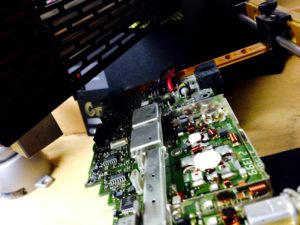
Internally you should never use glue or solvents on the component board of the radio. Superglue-like adhesives are an explosive/fire danger to a technician with a soldering iron. When touched with a hot iron components can actually be blown off the board causing a danger to the eyes, face and hands of the repair technician. Our techs are trained to watch for these types of substances, however, with the substance being clear it is sometimes hard to detect. So please keep this in mind the next time you or a well-intentioned employee thinks to glue something to a radio. Just say no! It will save you an unnecessary expense during your radio repair.

If you have questions give us a call here at Delmmar Communications, 800-872-2627. We are always happy to help.

~cl
tips to avoid radio repair

2-way radio boardWhile we enjoy helping people and repairing radios, we also know how frustrating it can be to have your radio fail and need to come into the radio repair center.

We feel your frustration!

We’ve compiled a list of ways to help you keep your 2-way radio out of the radio repair center.

  • Keep radios dry and free from dust and debris.
  • If your radio gets wet, do not transmit, take the battery out, dry it as much as possible and get it to the repair facility pronto.
  • Utilize dust covers provided to cover audio jacks and openings, do not remove them.
  • Refrain from operating the radio at full volume continuously.
  • Replace bad or weather checked antennas.
  • Use only the antenna, charger, and accessories designed for a particular radio model.
  • Always have the radio turned off when charging.
  • Never transmit when a radio is on a charger.
  • Charge overnight, not an extended amount of days (a weekend is okay).
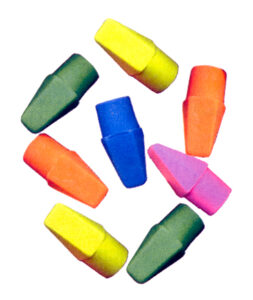
  • Clean your battery contacts using a pencil eraser, never a sharp object or solvent.
  • Replace the battery every 2-3 years, or sooner if needed.
  • Safeguard your radio from crush damage, avoid back pockets and places people sit.

We have a convenient radio repair form you can use to send in your radios for repair. If you have questions give us a call here at Delmmar Communications, 800-872-2627. We are always happy to help.

~cl
about CP200d batteries

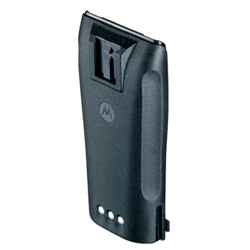
Motorola NNTN4497 batteryThe Motorola CP200d radio has come with 3 different battery types over the past few years. The CP200, CP200-XLS, and newer digital CP200d come with the NNTN4497 Li-Ion 2250 mAH battery. You can expect this battery to give you a good full work day of 12-14 hours. Life expectancy is approx. 18-24 months. Li-Ion is less likely to suffer from the memory effect which is common to the NiCd chemistry of batteries. It is the preference battery by most users.

The current NNTN4497 Li-Ion battery and the earlier NNTN4851 NiMH batteries need to use the fast rate charger to properly charge their battery packs. The fast rate charger is easy to differentiate from the trickle charger. The fast rate charging tray has outlines of several batteries depicted on the bottom of it, while the trickle charger has only one outline of a battery.

Some radio users received the trickle (slow rate) charger with their early model CP200 or CP150 radios. This slow charger is only useful for charging one chemistry of battery, the NiCd NNTN4496. Older model CP200 radios can be upgraded to use the more current Li-Ion NNTN4497 battery with a fast rate charger with no modification needed to the radio. You would simply need to purchase the Li-Ion battery and a fast rate charger. (The slow rate charger is no longer available. But not to worry, the NNTN4496 NiCd battery will charge just fine on the newer fast rate charger.)

Very similar to the original CP200 is a nearly identical PR400 radio. The PR400 radio uses the same accessories. When new the PR400 portable came with a slim Li-Ion 1600 mAH battery NNTN4970, which will also fit the CP200 radio.

The single unit and multi-unit fast rate drop-in chargers for the CP200d radios will accommodate any of the above mentioned battery types. The charger features a convenient insert which can be removed and turned around to fit the size of battery being used. This same insert has vertical rails which guide the battery into place, and will hold a battery alone or a battery attached to a radio in place during charging.

TIP: Always have your radio turned off when on the charger. And only charge your battery when it is 80% or more depleted. This will help you achieve a long full life from your batteries.

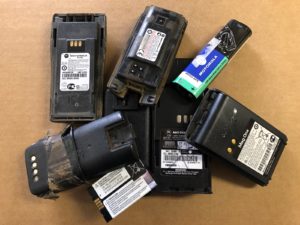
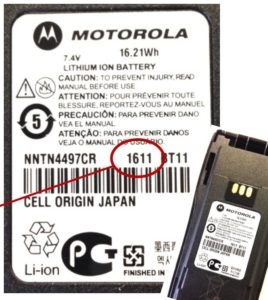
Motorola battery date codeMost batteries will last approx. 2 years (or 3 years if you treat them really well). Use the manufacturers date code to determine the age of your battery. On a Motorola brand battery the first digit(s) are the year and the last two digits are the week of the year.  Example: 1611 would be 2016, the 11th week, and 611 could also be the same date (or if very old it could be 2006, the 11th week). Keep in mind using an old battery for an extended period of time can eventually lead to the radio making a trip to the radio repair center. It is wise to replace your 2-way radio batteries every 2-3 years. This will help keep your radio in tip top shape.

If you have questions give us a call here at Delmmar Communications, 800-872-2627. We are always happy to help.

~cl
ahh the life (expectancy)

2-way radio batteriesSigns of a bad, defective, or aged battery include constant or intermittent static, a shorter work day, and intermittent or poor transmit. Transmit problems are an early indicator of a old or bad battery. It is simple, it takes more energy to transmit than to receive. So if you have a radio that receives perfectly, but is iffy on transmit, check your battery.

So then the question arises… What happens if I continue to use the old battery? Just like any home appliance operating on low voltage, your radio will eventually have failures associated with the brown out. Then the simple need for a replacement battery turns into a battery + radio repair. As you can see, it would be much cheaper and wiser to replace the old battery when needed.Motorola battery date code

How do you know the age of a battery?

On Motorola brand batteries you will find either a 3-digit code or 4-digit code on the label of the battery or embossed in the plastic of the battery itself.  (See above photo for an example.) The first number on the 3-digit code represent the year of manufacture, the next two numbers are the week of the year. Example: 611 would be 2016 (or heaven-forbid 2006) the 11th week of the year. The newer 4-digit date codes are easier, 1611 would be 2016, the 11th week.

If you have difficulty determining the age of a battery, give us a call here at Delmmar Communications, 800-872-2627. We are always happy to help.

special modifications


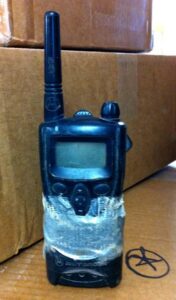
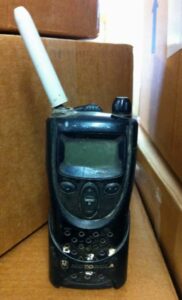
Occasionally radios arrive at our Motorola CP100 with duct taperepair facility with some unique modifications. These two CP100 UHF radios arrived together from one of our very favorite nursery companies. They were just so special we thought we’d take a picture or two and blog about them.

The first radio is a classic example of a radio with poor transmit and receive, caused inadvertently by the user. Both the microphone hole and the speaker grill are covered by duct tape. We can see the reason for the duct tape engineering, the carryholder was broken, and the user wanted the radio to stay in the carryholder. However, in doing so, they blocked the transmit and receive of the radio. Radio lesson: Be watchful when applying tape or stickers to the front of a radio. You might be covering up something you will need.

Motorola CP100 with sharpie antennaThe second one had lost its antenna covering and the user had fashioned a Sharpie pen cartridge to cover the coil. Now while this might be all the rage in the Sharpie fashion world, it is a very temporary fix for the problem. This radio would begin to lose range due to the coil being exposed to the outside elements. Little by little the coil would oxidize and/or corrode, until the radio’s transmit and receive would be shortened dramatically. So if you need to do this for a day or two, great, but then follow it up by getting the radio to the repair repair center and a new antenna installed. 2022 note: Replacement parts are no longer available for the original CP100 radio. Check with us for availability of batteries, chargers, and carryholders.

If you have questions about radios or radio repair give us a call here at Delmmar Communications, 800-872-2627. We are always happy to help.


2022 note: Replacement parts are no longer available for the original CP100 radio. Check with us for availability of batteries, chargers, and carryholders.

The replacement radio for this model would be the CP100d, CP185 or BPR40d.

more tips on better range

2-Way Radio CustomerHere at the radio repair center we get many questions about radio range (talk distance). Typically a handheld business radio will do 2 miles line-of-sight or as far as the radio can see. Several factors interfere with range, including but not limited to: curvature of the Earth, obstacles, height and placement of antenna, position of the radio, and using the correct antenna for the radio.
Range tips:

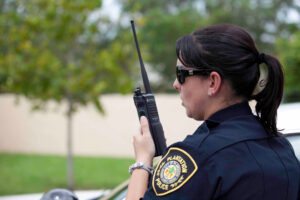
  • 1) Holding the radio upright with the antenna straight up gives you the best range. Tilting to the side, as if talking on the phone, will reduce the range by up to 2/3s. This will cause transmissions to drop out, or be very staticky. Just remember: Perpendicular to the ground is best!
  • 2) The body fluid of the person wearing the radio can absorb part of the range.  If you’re a little bit round in the middle, your radio will not work as well as your pencil-thin co-worker. You can compensate by wearing the radio higher your body. Maybe in a shirt pocket or with a chest pouch. Height and placement of antenna determines range.
  • 3) Use a good quality fully charged battery. It takes more energy to transmit than to receive. Using a good battery will do wonders to clear up static, making your transmissions clear.
  • 4) Use the appropriate antenna for your radio. While stubby (short) antennas may be available for your radio model, keep in mind these will significantly reduce range. If you are working in a close proximity, they may work wonderfully. However, if you are expecting to transmit a long distance, go back to the original standard length antenna.
  • 5) Check your antenna for damage. If you can bend the antenna and see the coils or if the top cap is gone, it is time to replace the antenna. This may do wonders for your range.
  • 6) Get your radio tuned up. Electronic components inside your radio age over time and the radio will not function as well as it did new. Getting your radio tuned and realigned will bring it back to factory spec, or as close as one can get with an older radio.

If you have questions about increasing range, give us a call here at Delmmar Communications, 800-872-2627. We are always happy to help.

radio range

Radio Repair CenterHere at the radio repair center we occasionally get questions about the range of a 2-way radio. Below are some simple answers to basic two-way radio range questions:

Portable radios generally will talk radio-to-radio, line-of-sight up to 2 miles. Once you start putting obstacles between the radios you will shorten your range. Even the body fluid of the person wearing the radio on their hip will absorb some of the range. Higher wattage radios will have a slight increase in range and a significant increase in clarity of transmission on the outer fringes of your range.

Mobile radios, such as those mounted in vehicles, will generally talk “radio-to-radio” 8-10 miles depending upon the obstacles and the terrain.

Base stations will generally talk approx. 8-12 miles. (referencing a simple base station where you use a mobile radio, power supply and outside antenna, aka a control station.)Contrary to popular belief wattage does not determine distance. Antenna height and placement determines distance.

  • Increasing Range:
  • 1) Hold your radio perpendicular to the ground, not slanted like you would hold a phone. This problem alone could decrease your range 30-50%.
  • 2) Don’t shout CB-style, shouting reduces talk-range on industrial-type radios.
  • 3) Be certain you are using a good, fully-charged battery.
  • 4) Check your antenna. Any exposed copper coil or weather checks which expose the coil when bending are a sign your antenna needs replaced. Also, keep in mind, use of a stubby antenna will reduce your range. The best antenna for a radio is generally the standard antenna it came with.
  • 5) And the technicians in the shop will tell you… have your radios serviced every two-three years to maintain peak performance.

Looking for even more range?

You might be in the market for a repeater, or have need to connect with a local repeater or trunking system which is already in place. But first, try bringing your radios to optimum range by following the above tips.

If you have more questions about increasing range give us a call here at Delmmar Communications, 800-872-2627. We are always happy to help.

water resistant radios

We often hear the question, “Is this radio waterproof?”

Truth is most radios are about as waterproof as your television. Electronic components and water just don’t mix. Then along comes a group of water resistant models. These radios are not waterproof, but are far superior in water resistance, and worth of mentioning.

Motorola XPR3300e is rated IP67 for moisture protection. Unlike other two-way radios, the back half of this radio is the battery pack. There are no openings to get inside the radio or see the component board. Being more of a sealed unit is what gives this radio the advantage over moisture. The IP67 rating tells us this radio has been tested for Immersion, up to 1 meter (3 ft 3 in) depth for 30 minutes, and passed the test. Additionally this radio is much better at keeping dust, dirt, and humidity out.

And yet a step better in water resistance… the Motorola XPR7350eXPR7350e is rated IP68 submersible. This radio, when used with the appropriate IP68 rated battery, passed tests submersing it in one meter of fresh water for longer than 30 minutes. While we don’t recommend trying this at home, this radio is the closest to waterproof you will find in the Motorola line. If you work in extreme conditions, this radio may be the one for you. Click this link to see the XPR7000 series brochure, which describes more about the radio.

Depending on your radio model there may also be a water-resistant remote speaker mic available. These are also rated to be moisture and/or water resistant. If you have lost radios or accessories to moisture, you should consider getting IP67 or IP68 rated radios/accessories with your next purchase.

And we would be amiss if we did not mention some basic information on what to do if your radio encounters water:

  1. Remove the battery. (Do not turn on or try to use the wet radio, as this could cause further damage.)
  2. Thoroughly dry the radio. You can use a towel on the exterior and battery compartment. If you feel the water has intruded further, use a blow dryer on a low setting to air dry the radio.
  3. Get the radio to a radio repair center ASAP. The longer you wait, the more likely the radio will grow corrosion, and be deemed non-repairable.

We’re here to help, and do our best to bring your radio back to good working condition. If you have questions give us a call here at Delmmar Communications, 800-872-2627. We are always happy to help.

mobile radio failure parts

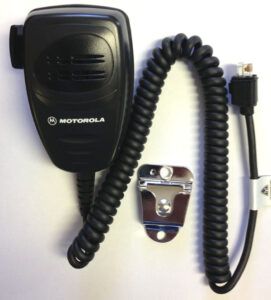
Motorola hand micIt’s the hand mic!

User-interface items on any type of 2-way radio are the most common to fail. The hand mic on a Motorola mobile radio is no different. The coiled cord gets stretch repeatedly, the PTT button gets pressed numerous times a day, and in general the mic gets tossed around during the work day. This are all things which eventually fail.

If your radio is not transmitting one of the simplest forms of troubleshooting is to try a known good mic on the radio. If this doesn’t solve the problem, the next step is to check your antenna connections, and your antenna itself. Either one of these items can cause lack of transmit. Note: Antennas can become loose, coax can get pinched, the rear connection on the radio can become loose. These are all common things.

2-way radio boardIf you don’t find the problem in the hand mic or antenna, you may have a radio in need of repair. The Delmmar radio repair center can look at your mobile radio and determine if it is in need of repair. There is a flat rate fee for nearly all models of mobile radios. Send your hand mic along with the radio and it will be tested also. Radio repair is typically less than 1/2 the cost of a new radio.

Hand mics for the most part are non-repairable, but replacement mics are usually reasonable in price.

If you have questions give us a call here at Delmmar Communications, 800-872-2627. We are always happy to help.

erase the grime

Pencil ErasersYou want to help keep your 2-way radio working problem free and possibly out of the radio repair center?

ONE SIMPLE TRICK:

Clean your battery contacts on the radio, battery and charger, with a pencil eraser. This will clean off the day-to-day grime and film, allowing your battery to make better contact with the radio and charger.  Try this simple tip, and enjoy a fully charged battery. This may just add months of time to the life of your battery.

Refrain from using any solvents or cleaners which may damage your battery contacts.

If you have questions give us a call here at Delmmar Communications, 800-872-2627. We are always happy to help.